Frame interpolation for iPhone

The frames in between,
drawn by AI.

Turn 30fps video into 60 or 120fps. Turn a normal clip you already shot into smooth 2× or 4× slow motion. Nothing is uploaded — it all runs on your iPhone.

Original FrameFlo
FrameFlo's comparison slider. Left of the divider is the original; right is the AI-interpolated result.
Download on the App Store
  • ★4.8 on the US App Store
  • Free to start
  • Pro is a one-time purchase
  • Nothing uploaded

Frame rate

Choppy video comes down
to frames per second.

Both sides show exactly the same motion with a different number of frames. Switch the tabs and compare.

Slowed down 4×7.5 frames/s
AI-interpolated 4× slow30 frames/s

Stretch a 30fps video to 4× and only 7.5 frames per second are left. When AI draws the missing frames, slow motion stays smooth. (Animation recreated to show the difference.)

Use cases

The videos it
makes smoother.

The moments you can't reshoot are the ones worth fixing afterward. Each guide walks through the how.

Features

Pick a video. Choose the result.
The AI does the rest.

AI frame interpolation

An AI model called RIFE looks at neighboring frames and draws the frame that belongs between them. No frame duplication.

Smooth 2× and 4× slow motion

Forgot to shoot in Slo-mo? Do it afterward. Previewing is free; saving slow motion requires Pro.

30–120fps, up to 4K

Export at 30, 60 or 120fps, at the original size or anywhere from 480p to 4K.

Compare with a slider

See the original and the result on one screen and drag the divider before you save.

See the result first

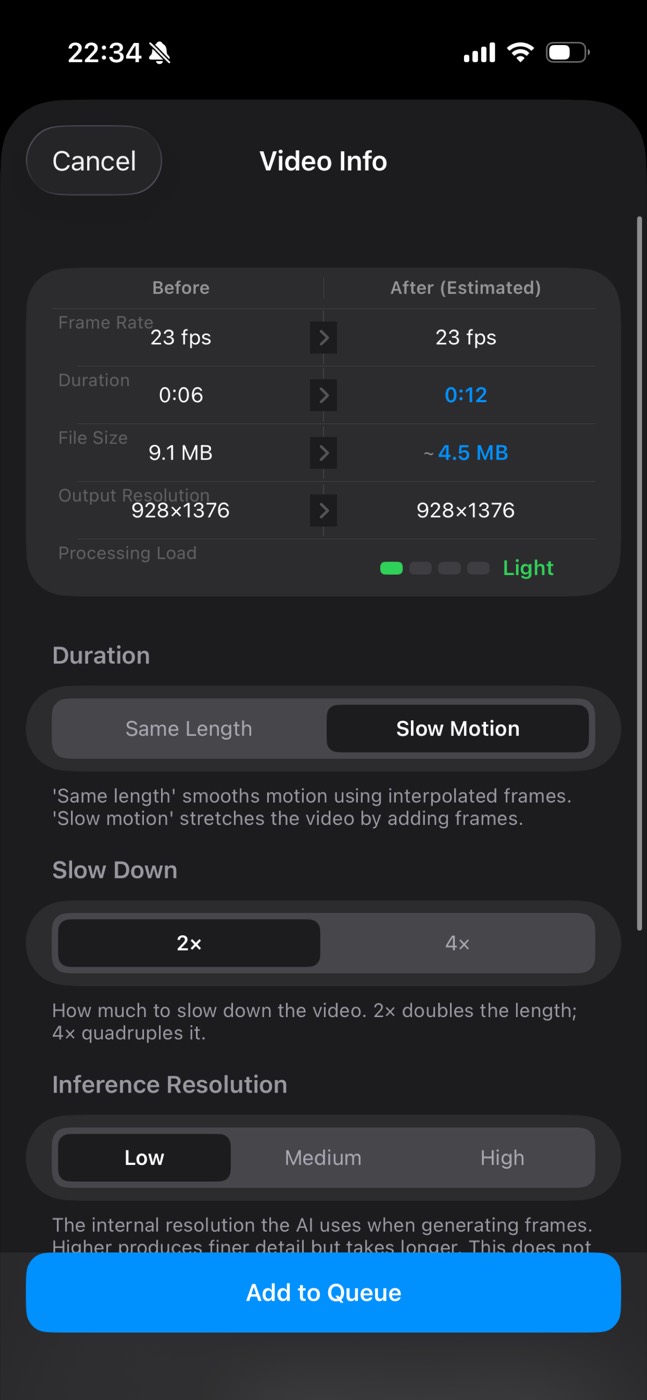
Output frame rate, duration, file size and processing load are shown before you start.

Queue it up

Videos are processed in order, with a notification when each is done. Queuing several and background processing are Pro.

120fpsMax frame rate
4KMax output resolution
4×Slow motion
8Languages

Interface

Nothing to figure out.

Every setting tells you what it changes.

Slow Motion selected with 2×: the estimated duration goes from 0:06 to 0:12
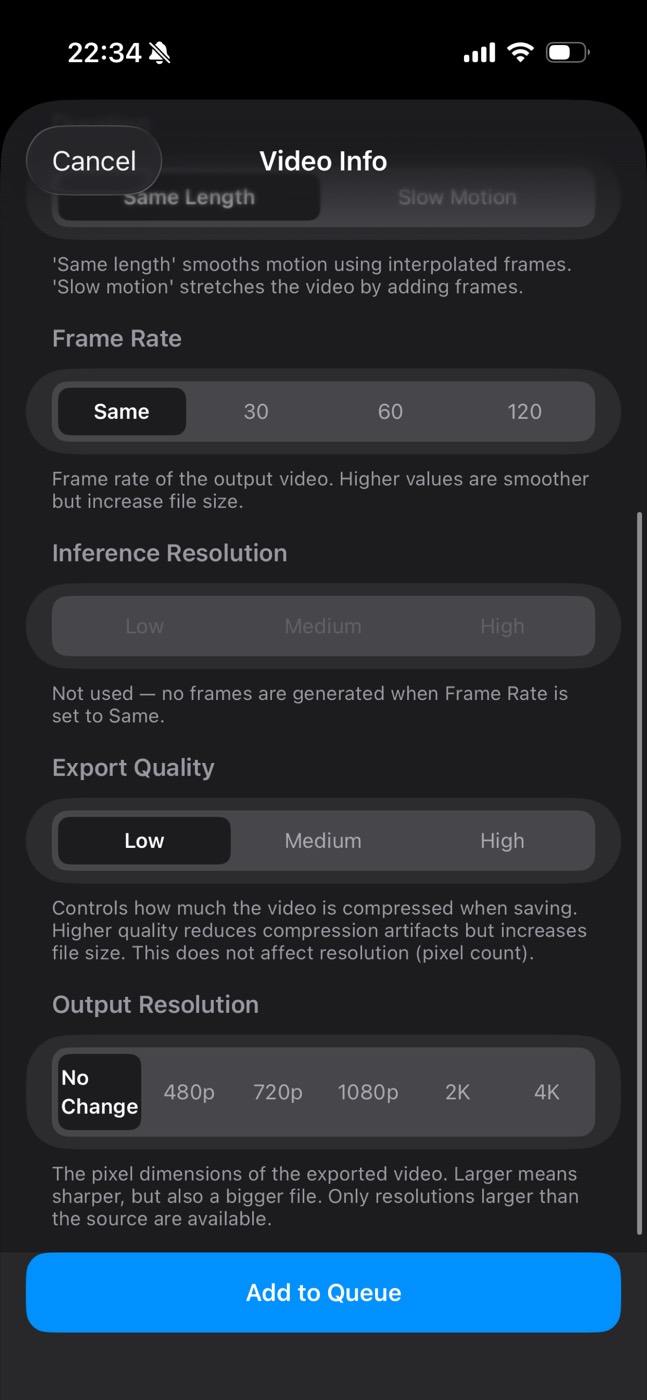
Frame Rate, Export Quality and Output Resolution settings
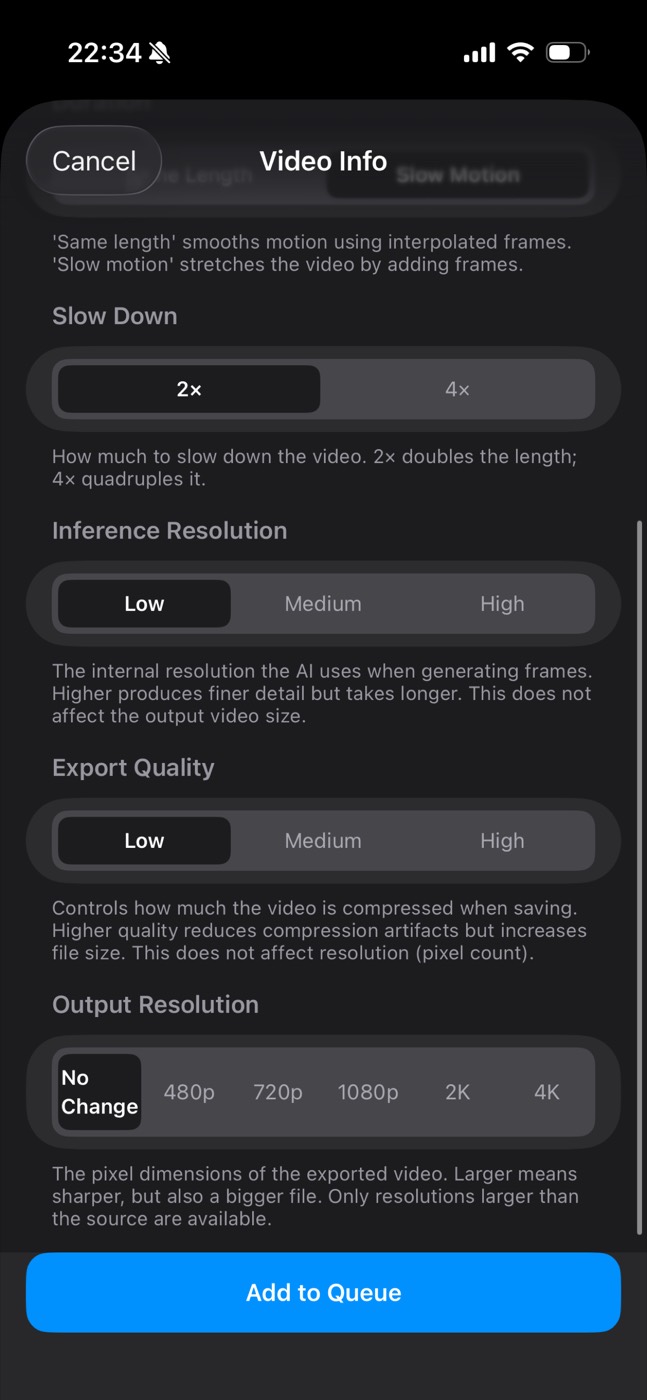
Slow Down and Inference Resolution settings

On-device

Your videos never
leave your iPhone.

All AI processing runs on your iPhone itself, using Core ML and the chip's Neural Engine. Your videos are never sent to a server. No account, no upload, no waiting in line. It even works in Airplane Mode.

No uploads No account Works offline No analytics Core ML / Neural Engine

Pricing

Try it free.
If you like it, buy it once.

Not a subscription. One purchase, no recurring fees.

Free

$0 (just download it)

  • AI frame interpolation up to 60fps — and you can save the result
  • Create 2× and 4× slow motion and preview the result. Saving requires Pro
  • Before/after slider comparison
  • Videos up to 10 seconds. For longer videos, try the first 10 seconds free
  • One video at a time (queuing several is Pro)
  • Export quality, output resolution and inference resolution are fixed
ONE-TIME

Pro

See the App Store for the price

  • No length limit. Process the whole video
  • 120fps output
  • Save slow motion. Export your 2× and 4× videos to Photos or Files
  • Choose any output resolution from 480p to 4K
  • Higher-bitrate export (Medium and High quality)
  • More precise interpolation (Medium and High inference resolution)
  • Queue up to 10 videos at once
  • Background processing (keeps going for up to about 30 seconds after you switch apps)

In-app purchase — buy once, it never expires. Moving to a new iPhone? Tap "Restore Purchase."

FAQ

Questions

What can I do for free?

Convert videos up to 10 seconds to as high as 60fps and save the result. For longer videos, the first 10 seconds can be trimmed and tried free. You can also create 2× and 4× slow motion and preview it; saving slow motion requires Pro.

Is Pro a subscription?

No. Pro is a one-time, non-consumable in-app purchase — no monthly or yearly fees. On a new iPhone, tap "Restore Purchase." See the App Store for the price.

Does it make my video sharper?

No. Frame interpolation makes motion smoother; it doesn't change resolution, noise or blur. See what frame interpolation is.

Are my videos uploaded anywhere?

No. Everything runs on your iPhone and works in Airplane Mode. The app only goes online for App Store pricing, purchases and restores.

Which iPhones does it work on?

iPhones with iOS 16 or later. Heavier settings use a lot of memory, so on lower-memory models (roughly iPhone 12 and earlier) lower the inference resolution or split long clips. It also runs on iPad as the iPhone version, but it's tested on iPhone.

More answers on the support page →

Guides

Know why it's choppy first.

Choppy video has more than one cause. Start with the most-read guides.

See all guides →

That video can still
be smoother.

Start with one clip you already have — 10 seconds, free.

Download on the App Store

Free to start · iPhone with iOS 16 or later